Provider Directory Notice:
Accurate information about your practice is critical to our members who rely on our provider directory. The Centers for Medicare & Medicaid Services requires HMSA to have current information in our provider directories to make it easy for our members to contact the providers in our network. To comply with this mandate, which can be found in the Consolidated Appropriations Act (CAA), we require providers to verify and attest the accuracy of their directory information. CAA requires that health plans remove providers from their provider directory when providers fail to attest or update their information. Third quarter attestations are due to HMSA by August 31, 2026. If we do not receive your attestation by that date, you will be removed from our provider directory.
You will now be able to access the Provider Self Service Portal from HHIN+: https://hhinplus.hmsa.com/HHINPlus/ProviderSelfService. This link to the Provider Self Service Portal can be accessed publicly as well as when logged into HHIN+.
To submit your quarterly attestation via the provider self-service portal, please follow the directions below:
We ask that you verify that we have your correct Find a Doctor information at hmsa.com/search/providers for each of your practice locations, group or facility, by reviewing your information on the self-service portal. Once confirmed, submit your attestation online. Also continue to submit any changes such as your ability to accept new patients, your street address or appointment phone number, or anything else that may affect patient access to care. In addition, please ensure that the following data points are accurate and up to date:
| Name |
| Gender |
| Participating office locations |
| Specialty, if applicable |
| Medical group affiliations, if applicable |
| Participating facility affiliations, if applicable |
| Whether accepting new patients |
| Contact information |
| Board certifications |
| Languages spoken other than English by clinical staff, if applicable |
Once you login to self-service portal:
- Look for the Directory Data Attestations section on the left side of the home page.
- Click on the Attest Current Information is Correct button to submit confirmation. (If you can’t see this button, you may need to zoom out.)

- Once submitted, you’ll see a green check mark validating that your attestation has been submitted.
- If your current information is not accurate and changes are needed, please submit changes to your information using the Provider Self Service Portal. Submitting changes OR attesting to your current information will count for your quarterly attestation.
Users may login to the Provider Self-Service Portals to submit changes for information that may affect patient access to care. More information can be found at Updating Your Provider Record. Once submitted, your directory information will go to HMSA’s Provider Data Department to confirm the changes. Your directory updates will be visible once those changes are confirmed and will then be reflected in HMSA’s Online Provider Directory, Find a Doctor. If you need to review or want to confirm that changes were submitted, you can view them on your Practitioner Submissions or Group Submissions tabs. If you need to follow up on changes submitted via the self-service portal or hard copy forms, please contact our Provider Data department: provider_data@hmsa.com.
Note: Some group and facility changes are currently not available on the provider self-service portal and need to be done through a hard copy form, which can be found at Provider Information Forms.
Self Service Portals:
If you have any technical issues with your attestation submission using the provider portal, you may submit your attestation by email to Provider_Attestation@hmsa.com. Please note that this email should only be used in the event of a technical error.
If you have been removed from our provider directory, we encourage you to rejoin us so that your patients are aware of your participating status with HMSA. To rejoin HMSA’s provider directory, please follow the steps outlined below. Note that once you rejoin, your attestation will be required each quarter going forward to remain in the provider directory.
Accessing the HMSA Provider Portal
Here are the steps to access the HMSA provider portal, where you can rejoin our online provider directory:
- For individual providers, go to provider.hmsa.com/ProviderSelfService/Verify/p and log in.
- Please be sure to use your full 10-digit provider ID number that you received in your credentialing confirmation letter from HMSA and enter it in as it appears on your letter since the system is case sensitive. Zeroes will auto populate as you start entering in your ID number, however, please enter in or paste your full 10-digit provider ID. If you have multiple active provider ID’s, please use one that is associated with you as an individual and not as an entity.
- For group contracted providers, go to provider.hmsa.com/ProviderSelfService/Verify/g where group administrators may log in and submit attestations for all providers in their group.
- The group self-service ID is the 6-digit root ID assigned to the group which can be found on the quarterly reminder letters from HMSA.
- For facilities, go to provider.hmsa.com/ProviderSelfService/Verify/f where facility administrators may log in and submit attestations for their facility.
- Be sure to use your full HMSA Provider Number. This functions similarly to the HMSA Provider ID where you will need to enter in the full 10-digit number.
Rejoining Our Online Provider Directory
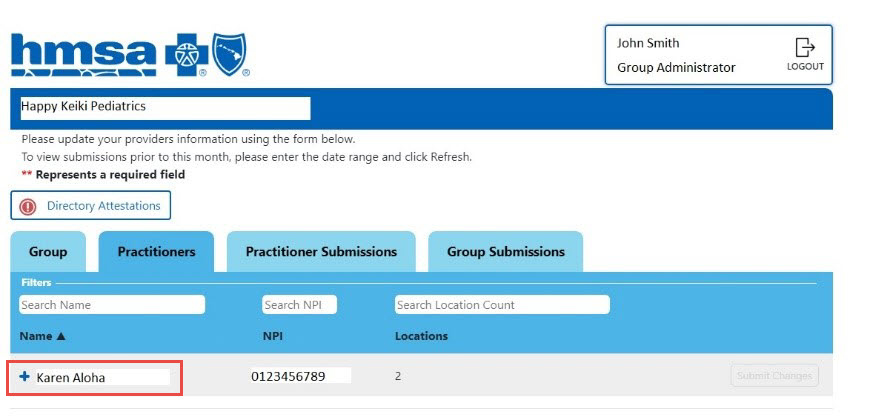
- Upon log in, you will arrive at your unique provider directory homepage.
-
Click on the + sign next to your provider name to expand all available menu options.
-
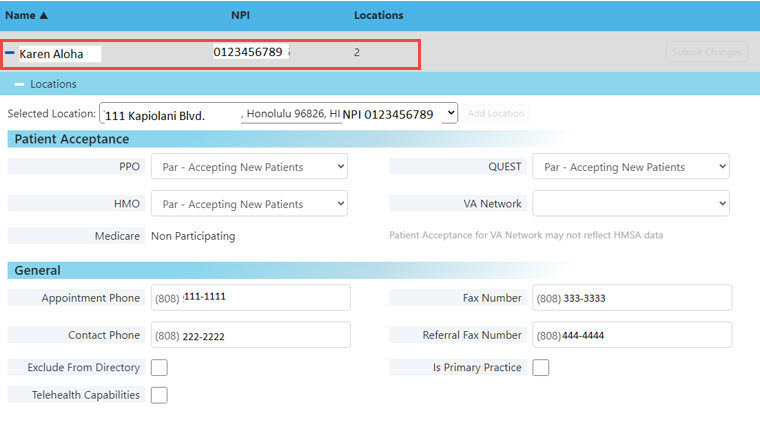
Next, click on the + sign next to Locations to expand all applicable location information
-
Once you have verified your location(s), uncheck the ‘Exclude from Directory’ box and then click ‘submit changes’ to save your update
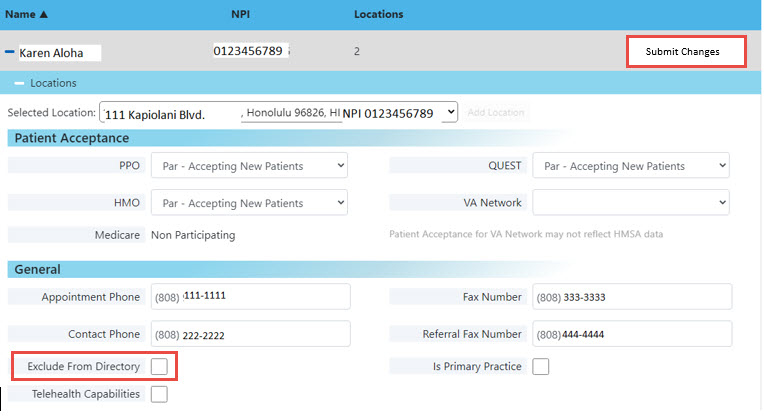
Note: The group self-service Exclude from Directory buttons will be under Your Locations. You'll need to click the + sign to expand your locations and see the details. See below.

Frequently Asked Questions
I called HMSA Customer Relations and they informed me the provider ID I have is terminated. How can I login to attest? Why was it terminated?
A provider ID can be terminated if you closed one of your locations or if you recently changed your tax ID or NPI number. Only an active provider ID can be used to log into the Provider Self Service Portal.
I am only seeing members via telehealth and no longer have my physical practice. However, my practice location is still on the directory. How can I inform HMSA that I am still seeing members via telehealth?
HMSA needs a physical address to have an active provider ID. However, you can update your address to a home or mailing address and exclude it from the directory.
If I am in HMSA’s Primary Care Payment Model (PCPM) program and will completely close my practice, what date should I put on the close location form in the “last seen patients date” section?
The PTM term date and the complete closure date should be on the last day of the month and match. For example, if your complete closure date is 12/31/2022, your PTM term date should be 12/31/2022. If your complete closure date is before your PTM term date, this would cause missed Per Member Per Month (PMPM) payments.
I logged into our group self-service portal and need to remove one of one our providers. What do I do?
Once logged in, please find the provider you want to remove from group. Click on the plus sign next to their name and locate the close location request. It will ask you to confirm the reason for closure, the last date they will see patients at location you’re closing and the forwarding PCP. The reason for closure can be ‘no longer with group’. If the provider you’re removing is a specialist and does not have a forwarding PCP, you can type in Not Applicable. Please be advised that submitting a close location for a provider in your group is not closing your group practice. It is only closing out that provider, so they are no longer affiliated with your group. If your group needs to close one of your group locations, please complete the closed location section in the Group tab in the Group Self Service Portal.
I do not see one of our providers in our group self-service portal. Why are they not listed?
If this provider sent in an application to become par with HMSA, that provider will not be added to your group portal until they receive their confirmation letter with their provider ID number for your group.
Revision History
| Date | Nature of Revision |
|---|---|
| 08/03/2026 | Migrated to new platform.
|