
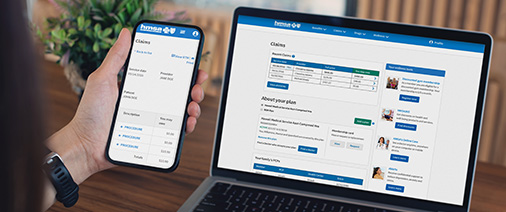

Pay bills online! eInvoice Connect offers enhanced security and improved functionality to make managing and paying your bills easier than ever. For the best experience, please use a desktop computer with the latest browser version. Mobile browsers may not be fully supported.
If you received a notice about your premium billing, you can quickly create a My Account or an Employer Billing Portal account to:
- Check your current balance and past bills.
- Make one-time payments.
- Enable, update, and/or review your automatic payment settings.
Please refer to the step-by-step instructions with photos below or the guides for assistance in updating your payment information and settings.
Instructions for Paying Online
Members
Employers
Frequently Asked Questions
Can I pay my premium by credit card? Is there a credit card fee?
Yes, you can pay your premium online by credit card. For employer groups only, a 3% processing fee applies. You can choose to pay by ACH (bank transfer), which has no processing fee. View these instructions [PDF] to set up ACH payments.
I recently paid my bill. Why did I receive a delinquent notice?
We’re experiencing delays with payment processing and apologize if you’ve received a notice by mistake. You can check any outstanding balances in My Account on hmsa.com. Employers can check the HMSA Employer Billing Portal at hmsa.com/login.
How do I know if I’m already enrolled in automatic payments?
Please review your premium bill carefully. Toward the bottom of the bill above the tear-off line, there will be a message in all capital letters if you’re already enrolled in automatic payment. It will say: FOR YOUR RECORDS ONLY – PLEASE DO NOT SEND PAYMENT, YOUR ACCOUNT HAS BEEN ENROLLED IN AUTOMATIC PAYMENTS. If you do not see this message, your automatic payment was not set up before the bill was generated. If you haven’t already done so, please write a check and fill out the automatic payment form on the back of the bill if you would like to set up automatic payments again moving forward.
I mailed in my automatic payments form. How long will it take to process?
It takes about 30 days from when HMSA received the form to set up automatic payments. Please review your next bills carefully for confirmation. If you sign up for automatic payments online, it’ll start on the next billing cycle.
Why did I get a hard copy bill when I signed up for automatic payments?
You must update your paperless preferences in the new system within the Notifications Settings section.
Do I need to update my automatic payment information if my premium changes?
- Yes, if you set up automatic payments through My Account, you’ll need to log in and update the Maximum Amount field to match your new premium. This will ensure the correct amount is paid.
- If you mailed a form to HMSA to enroll in automatic payments, we’ll update your payment information for you. It takes about 45 days from when HMSA received the form to setup automatic payments. Please review your next bill carefully to confirm if you’re enrolled in automatic payments.
Do I need to set up automatic payments separately for my medical and dental plans?
Yes, you’ll need to set up automatic payments separately for your medical and dental plans.
- Through My Account: You can link both plans under the same My Account, but you will need to enable automatic payments for each separately within the system.
- You can send an authorization form by mail and include both of your medical and dental information.
If this is your first time making a payment:
Members:
- Log in to My Account. If you don’t have one, you can follow the instructions in HMSA’s My Account for HMSA members.
- Once logged in to My Account, select Pay my bill and you will be redirected to eInvoice Connect.
Employers:
- Contact a Membership Services representative at 808-948-6376, Monday-Friday, 8 a.m.-5 p.m., with the following information:
- Group number, company name, and company address.
- Once verified, go to the HMSA Employer Billing Portal(bookmark this page) on hmsa.com/employers.
- Click Forgot password? and check your email for a reset password link.
- Once your password has been updated, return to the Employer Billing Portal to log in.
Additional instructions
To update payment settings
- On the Settings Page, click Payment Settings.
- Click Payment Accounts.
- Click Add Bank Account or Add Credit Card.
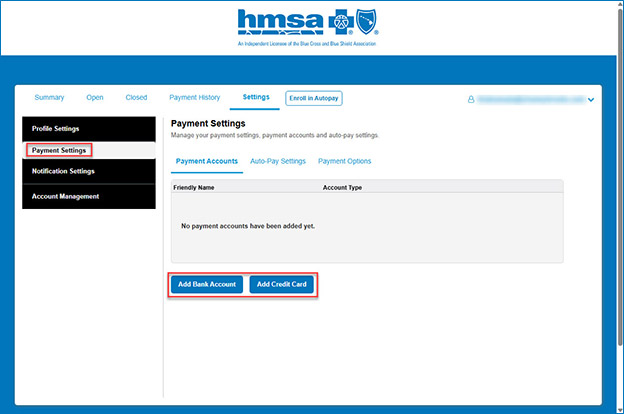
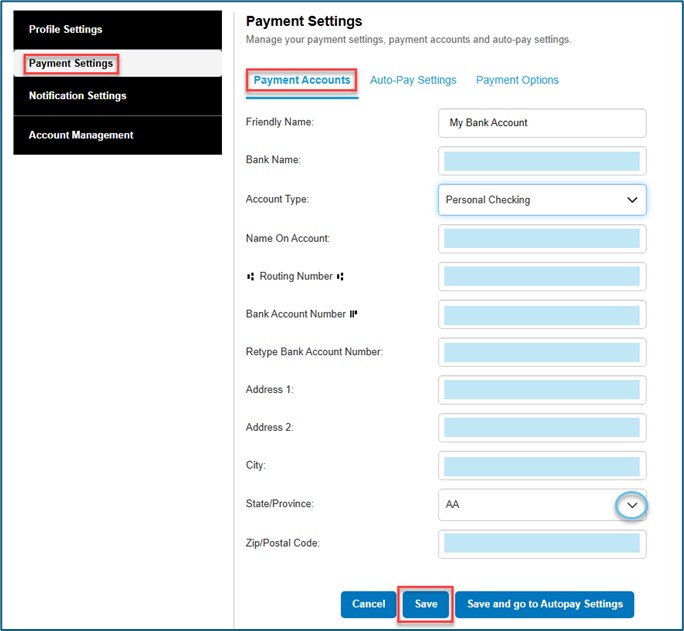
- Enter your bank information and click Save.
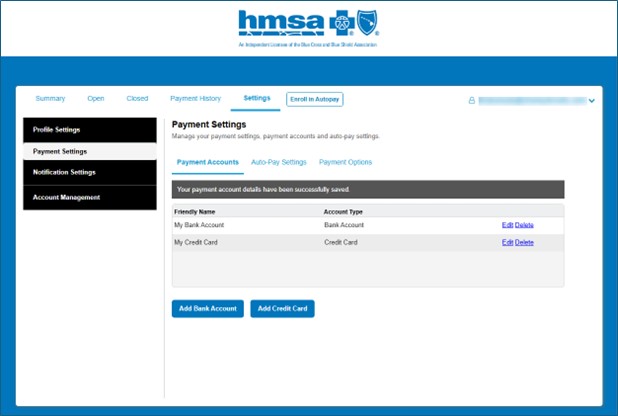
- Once the bank account or credit card was added it will show under Payment Accounts.
To enable automatic payments
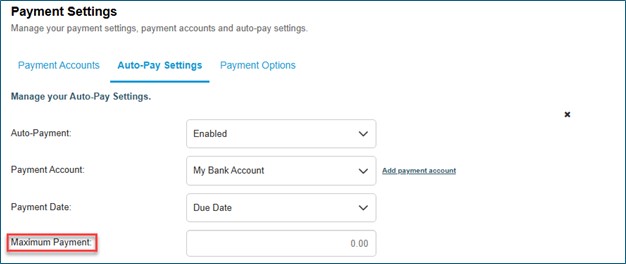
- Once you’ve added a Bank Account or Credit Card, click on the Auto-Pay Settings tab and Click Edit.
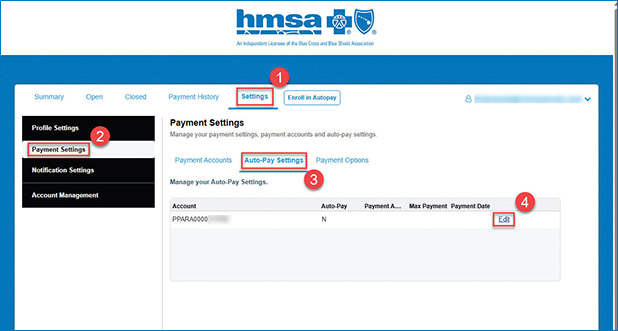
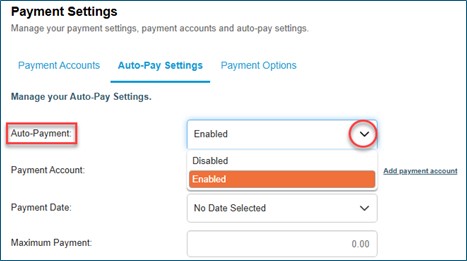
Complete the configurations for automatic payments:
- For the Auto-Payment field, update Disabled to Enabled.
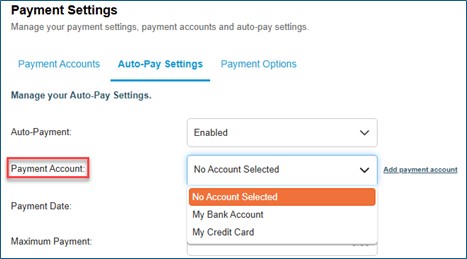
- For Payment Account, select a payment method.
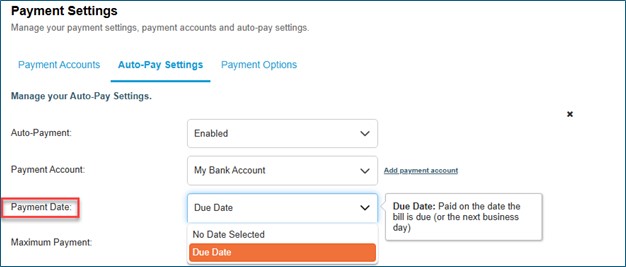
- For Payment Date, select Due Date.
- For Maximum Amount, enter an amount.
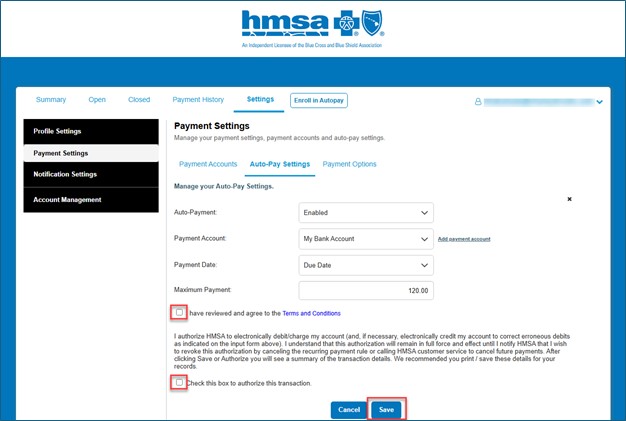
- Agree to the Terms and Conditions and click Save. Once your autopayment is set up, it will be displayed on the Auto-Pay Settings tab.
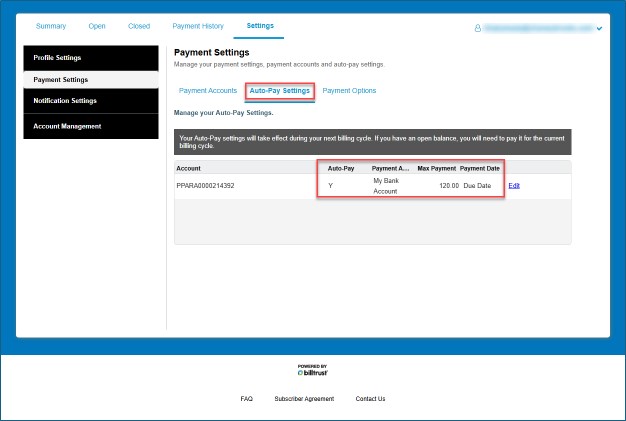
- Once your autopayment is set up, it will be displayed on the Auto-Pay Settings tab.
To make a one-time payment
- Select the invoice you’d like to pay and click Pay Other Amount or Pay Other Amount or Pay.
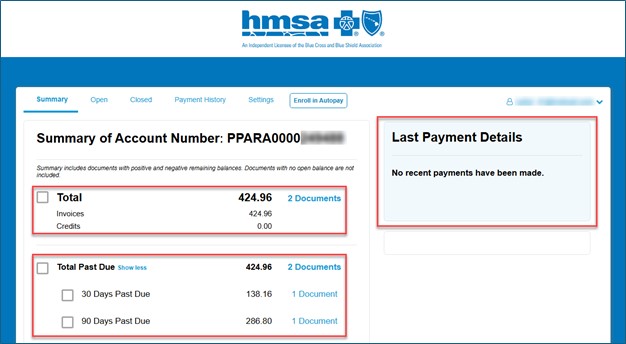
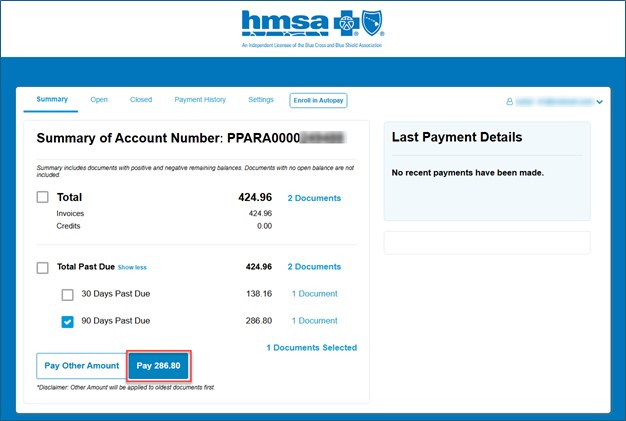
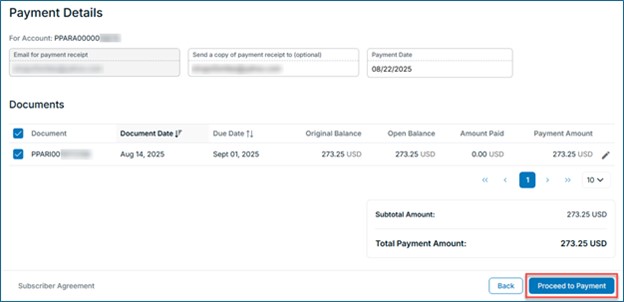
- On the Payment Details page, click the Proceed to Payment button.
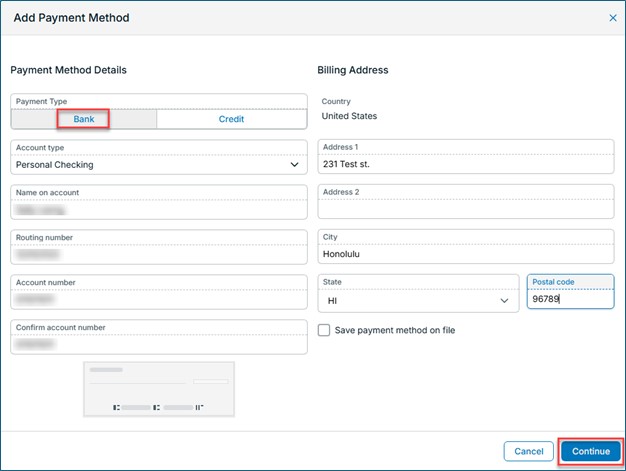
- Enter your bank information and click Continue.
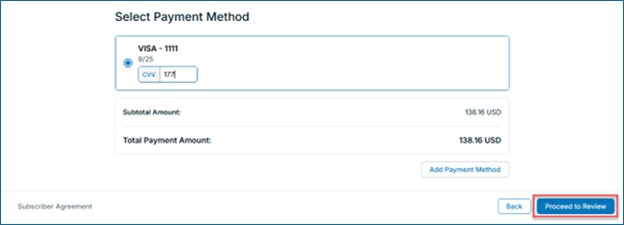
- Click the Proceed to Review button.
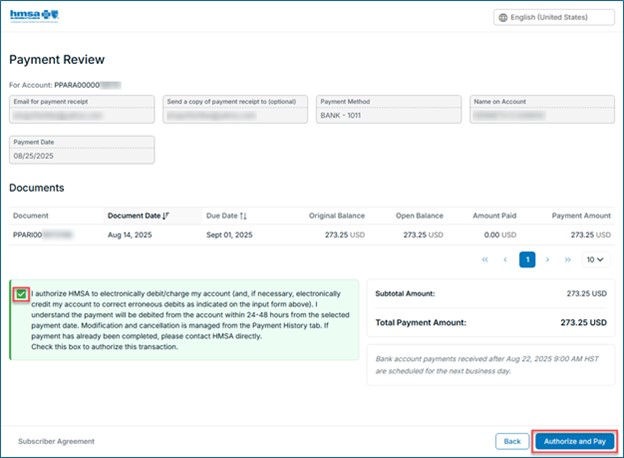
- A receipt will be emailed to your registered email. You can also send a copy to another email address, but this is optional. Check the authorization box and click the Authorize and Pay button.
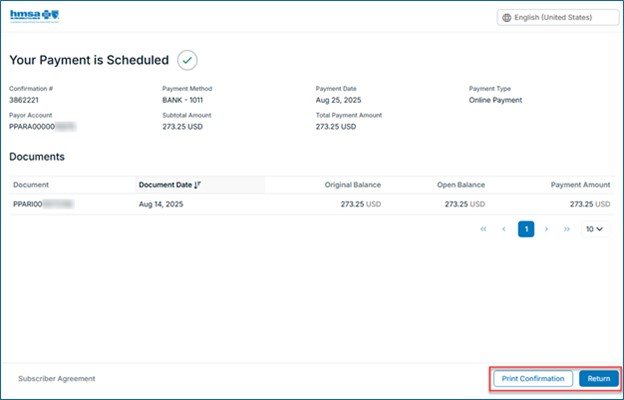
- Once you’re done, you’ll be taken to a confirmation page with a summary of your scheduled payment details. Click Print Confirmation to print a copy for your records or click Return to end your session.
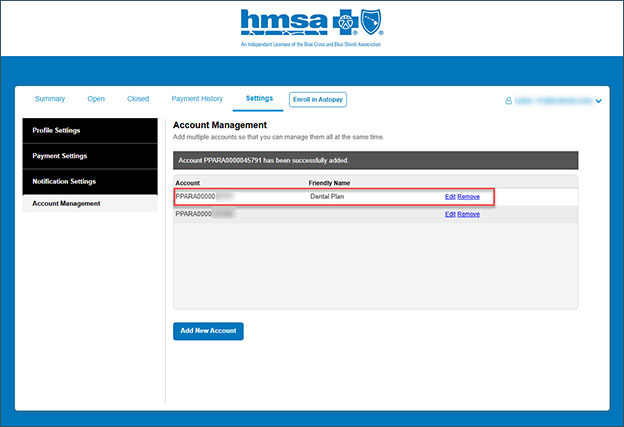
To link accounts
If you have separate medical and dental plans, you can link both accounts:
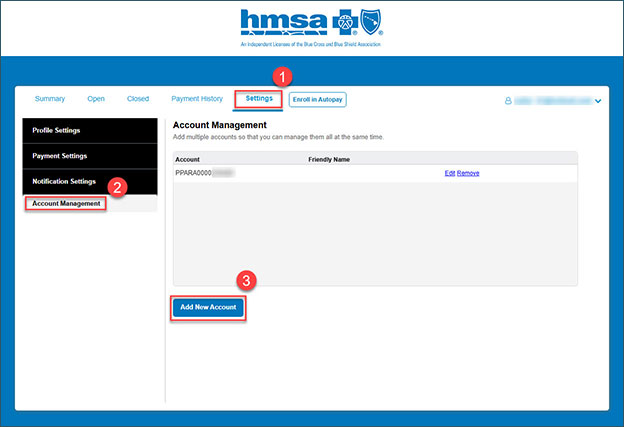
- Go to Settings, click Account Management, then Add new account.
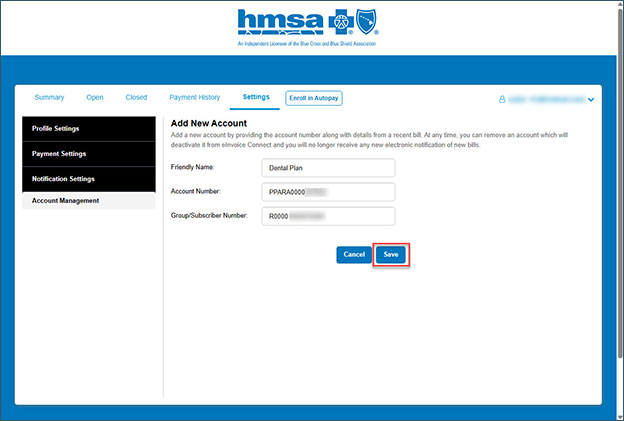
- Complete the three fields and click Save. You can find your medical account number (starting with PPARA) and your subscriber ID number (starting with R) listed on previous bills.
- Return to the Account Management page, select Edit, and update the newly added account with your payment information and automatic payment settings.
You can also pay your bill in-person at our HMSA Centers or by mail.
Questions? We’re here to help. Contact us:
- Individual plan members:
- 808-948-6140 or 1-800-782-4672.
- Monday-Friday, 8 a.m.-5 p.m. (Afternoons are the best time to reach us by phone.)
- ms1call@hmsa.com.
- HMSA Medicare Advantage members:
- 808-948-6174 or 1-800-782-4672.
- TTY: 711.
- Monday-Friday, 8 a.m.-5 p.m.
- Employer groups:
- 808-948-6376 or 1-800-316-4672.
- Monday-Friday, 8 a.m.-5 p.m. (Afternoons are the best time to reach us by phone.)
- ms1call@hmsa.com.